NoteWorthySoftware.com
My Noteworthy Software Community  
2010-09-02 10:54 am *
Welcome, Guest. Please login or register.
Did you miss your activation email?

Login with username, password and session length
News: Licensed NWC2 users can upgrade their community membership [more]
 
   Home   Help Login Register  
Pages: [1]   Go Down
  Print  
Author Topic: Printing problem  (Read 5639 times)
Nadine
Member

Offline Offline

Posts: 1


« on: 2008-02-27 06:52 pm »

Hi,
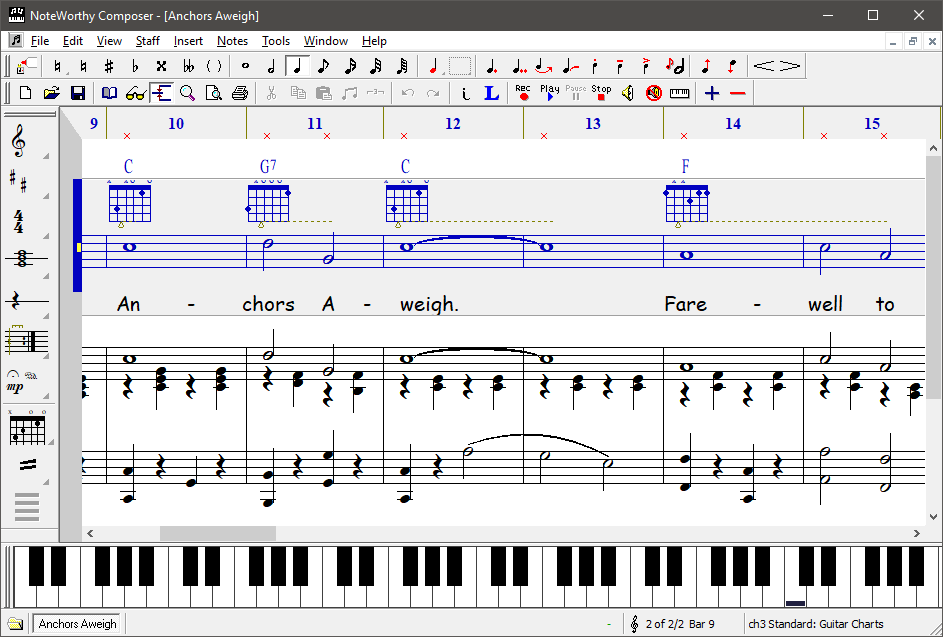
   I am new to this.  I found the song I needed at CyberHymnal and it was in Noteworthy so I knew I could play it.  It played beautifully but when I tried to print it out.- the notes, rests, clefs etc. all printed beautifully along with the words - but no staff lines.   It is completely unusable like this.  Can anyone help or even give me an idea what to try.
    Thanks much.
          Nadine
Logged
Lawrie Pardy
Virtuoso

Offline Offline

Posts: 2369

I plays 'Bones, crumpets, floosgals 'n youfonymums


« Reply #1 on: 2008-02-27 08:03 pm »

G'day Nadine,
umm, can't remember exactly and a quick search locate a reference I was looking for, but...

Check and update (if necessary) your video and printer drivers.  The cause will be in one of these...  The printer driver is the most likely.
Logged

NoteWorthy Online
Admin

Offline Offline

Posts: 3160


« Reply #2 on: 2008-02-27 08:55 pm »

This problem has resurfaced lately. Based on our support requests, HP printer drivers are especially prone to this bug. We have received some reports that changing some of the print options can sometimes work around this print driver bug.
Logged
BobPetty
Member

Offline Offline

Posts: 24


« Reply #3 on: 2008-03-04 04:30 pm »

Hi Nadine

I agree with Lawrie Pardy and Noteworthy Online that the most likely cause is the printer driver.  HP's LIDL (Lightweight Imaging Device Language) drivers in my experience are the worst offenders.  If yours is an HP printer, and is PCL3 compatible, as distinct from LIDL, try installing the HP Deskjet 550C driver.  This driver is natively available in all flavours of Windows from 95 on, and is the "lowest common denominator".  Failing that, make a nuisance of yourself on the manufacturer's support website!  If you would like to post back the make/model of printer you have, and the version of Windows, I will be happy to offer further assistance.

Logged
ArtificialIntel
NWC2 User

Offline Offline

Posts: 3


« Reply #4 on: 2008-03-05 04:24 am »

Hi Nadine

I agree with Lawrie Pardy and Noteworthy Online that the most likely cause is the printer driver.  HP's LIDL (Lightweight Imaging Device Language) drivers in my experience are the worst offenders.  If yours is an HP printer, and is PCL3 compatible, as distinct from LIDL, try installing the HP Deskjet 550C driver.  This driver is natively available in all flavours of Windows from 95 on, and is the "lowest common denominator".  Failing that, make a nuisance of yourself on the manufacturer's support website!  If you would like to post back the make/model of printer you have, and the version of Windows, I will be happy to offer further assistance.


Don't forget that you can have more than one printer (driver) installed in Windows for the same physical printer so there should be no need to uninstall the usual drivers you use by default. Just select the HP Deskjet 550C printer when you come to print.

Regards

John
Logged

Nil illigitemae carborundum
llucyy
NWC2 User

Offline Offline

Posts: 63


« Reply #5 on: 2008-03-06 02:46 am »

Have you tried one of the free PDF makers eg PDF Creator, and make it into a PDF and then print it. Just a quick one-off work-around to get a score.
Logged
NoteWorthy Online
Admin

Offline Offline

Posts: 3160


« Reply #6 on: 2008-03-10 05:33 pm »

Judging by our recent support queries, specifically the HP Photosmart line of printers are a popular printer series that exhibit this buggy behavior.
Logged
Lawrie Pardy
Virtuoso

Offline Offline

Posts: 2369

I plays 'Bones, crumpets, floosgals 'n youfonymums


« Reply #7 on: 2008-03-10 05:48 pm »

I remember in the '95/'98 days that changing between RAW and EMF could often solve problems like this.

I wonder if a similar change in the print driver's |Advanced|Print Processor| selection might help..?
Logged

Pages: [1]   Go Up
  Print  
 
Jump to:  

Powered by SMF 1.1.11 | SMF © 2006-2009, Simple Machines LLC
Page created in 0.069 seconds with 18 queries.

Copyright © 2010 Noteworthy Software, Inc.
All Rights Reserved